

https://www.estesparknewcomers.org/wp-content/uploads/2026/02/Newcomers-Notes-02.02.26.pdf
TECH TIP: Who’s the Primary Contact?
Welcome to Tech Tips! In this series, our Technology team will share simple tips and techniques, to help you get the most out of the Club's technology resources.
Finding the Primary Contact for Your Account
In our Newcomers Club, membership is at the household level; yearly membership dues are charged to the household, not to each individual.
This is also true in our web-based membership system: each household has a single account. Within each account, one login (email/password) is designated as the primary contact. The primary contact can perform account level administration, such as:
- Pay membership dues online
- Set the directory photo (encouraged!)
- View the history of registrations and payments
- Create additional contacts
However, all contacts, including the primary contact and any additional contacts, can perform many actions on the website, such as:
- Register one or multiple attendees for events such as general meetings
- Pay online for general meetings or special events
- Sign up for interest groups
- View the event calendar, the member directory and all other sections of the website
To determine whether you are the primary contact for your account, log into the website and go the ABOUT YOU page. If you see the following five buttons at the top of the page, you are the primary contact and can pay your dues.
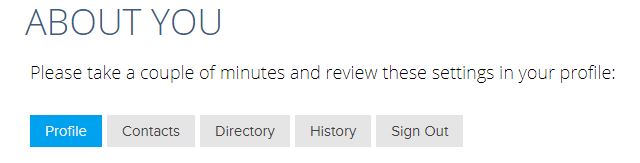
If you only see two buttons at the top of the page, like the screenshot below, someone else is the primary contact for your account.
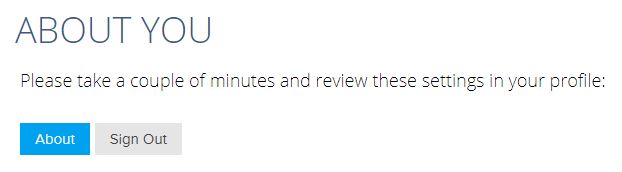
If you have any questions, or if you need to change the primary contact on your account, contact tech@estesparknewcomers.org.
TECH TIP: Check Spam for Newcomers Email
Welcome to Tech Tips! In this series, our Technology team will share simple tips and techniques, to help you get the most out of the Club's technology resources.
Check for Newcomers Group Emails in Spam Folder
Sometimes email messages from the Newcomers club, or from your Newcomers interest groups, may end up in your spam folder. Here are some tips for finding those emails and hopefully preventing them from being marked as spam. You may need to do this periodically.
First: check your spam (or junk) folder to see if there are any messages that are not actually spam. If you find some, mark them as "not spam". The specific process will vary depending on which email app (or website) you use. This should help get these messages delivered to your inbox in the future.
Also it often helps if you add the sender to your Contacts list in your email app.
Some email systems catch spam messages before they get delivered to your local email app, so they don't even make it to your local spam folder. We are aware that this can happen with Comcast email addresses, and Microsoft based email addresses like @hotmail.com, @live.com, @msn.com and @outlook.com. In this case you will need to login to your web-based email server and check the spam or junk folder. See below for some specific instructions for Comcast and Microsoft based email servers:
Microsoft:
- Log into your Microsoft account in a web browser by going to www.msn.com or https://outlook.live.com/
- Open up your email
- Find the email in your junk or spam folder
- You should be able to right click and then select Not Junk
- or there may be a note across the top of the message near the subject that says something like "This message was identified as junk."
- Once you tell the system that a message isn't junk, it should pop up a window that says something like "Mark as not junk", at which point you click "OK".
Comcast:
- Sign into your Comcast / Xfinity Email account from a computer
- Select the Email icon
- Select the Spam folder
- Find and select the desired message
- From the toolbar at the top, select the Not Spam button
Another option is to add the sender email address as a contact (again in the web portal) and that should automatically mark those emails as ok to deliver.
Comcast doesn’t allow you to white list email senders like other email providers. So that sort of limits any further options; if neither of these actions fix the delivery issue then you may need to call the Comcast's Security Assurance group at 1-888-565-4329.
If you have any questions, contact tech@estesparknewcomers.org.
Interest Group Activities
To ensure that you receive information from the interest group leaders, regarding their activities / times / dates, please sign up to become a member of that group. To sign up for interest groups, please sign in on our Club website. Once you have logged in, click on "Check out the Interest Groups" under the quick links section. This will take you to the interest groups page and from there click on "sign up for interest groups". On this page, select the interest groups that you would like to join.
Dining In
Dining In is a great way to socialize with other Newcomers in a more intimate setting. On the 1st Saturday of the month, the group members are divided among individual host homes, and each volunteer host determines how many people they can entertain. The host provides the main dish and beverages, and each participant brings a dish to share – anything from appetizers to dessert! The group sizes vary from six to 12 people and is determined by the individual hosts.
Mark your calendars – Dining In will meet on the first Saturday evening of each month beginning anew this coming May. Arrival time is up to the hosts, but usually the participants arrive around 5:30 so there’s time to enjoy conversation, beverages, and appetizers before the main meal. Our first gathering is scheduled for May 7. The Dining In group leaders will reach out to each member of this group via email to set up the hosts and their guests. Please make sure to sign up as a member of this group in order to receive emails and instructions each month.
Museum and a Meal
Let’s get to know each other by exploring museums, artists and restaurants in Denver, Boulder, Loveland, Longmont, Fort Collins and the Estes Valley. We’ll meet during the first week of the month, usually on a Thursday or Friday, and at varying times of the day depending on museum schedules and tour availability.
TECH TIP: How to Change Your Password
Welcome to Tech Tips! In this monthly series, our Tech Ops team will share simple tips and techniques to help you get the most out of the Club's technology resources.
Changing Your Password
In case you have had difficulty getting your website password changed, here are the instructions.
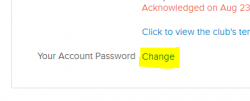
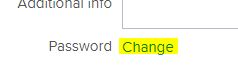
When you sign in and go to the "ABOUT YOU" page, it shows your profile and other account info. At the bottom of the box with your name and address, you will see the blue word "Change", as highlighted below in two possible layouts:
- Click the word "Change".
- Type a new password in the box that is displayed.
- Press the Enter key.
Voila! Your password should be changed. Be sure to remember your new password for the next time you log in to the website.
If you still have trouble getting your password changed, or if you have any other questions, contact tech@estesparknewcomers.org.
Interest Groups – How To Sign Up




Interested in Interest Groups but don't know how to sign up? Or maybe it has been a while and you need a refresher. Our Tech team has created a video tutorial to walk you through the simple sign-up process. Check it out here.
For a list of the complete Interest Group roster, click here. Our calendar is up to date so you can look at all the upcoming activities.
- 1
- 2
- 3
- …
- 5
- Next Page »