

GIVING BACK  |  WHAT'S GOING ON  |  JOIN US!  |  SIGN IN
logo
Sign In or Sign Up
  • GIVING BACK
  • WHAT’S GOING ON
  • JOIN US!
  • MEMBER SIGN IN

TECH TIP: How to Change Your Password

Welcome to Tech Tips! In this monthly series, our Tech Ops team will share simple tips and techniques to help you get the most out of the Club's technology resources.

Changing Your Password

In case you have had difficulty getting your website password changed, here are the instructions.

When you sign in and go to the "ABOUT YOU" page, it shows your profile and other account info. At the bottom of the box with your name and address, you will see the blue word "Change", as highlighted below in two possible layouts:
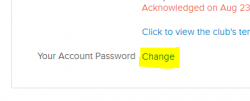
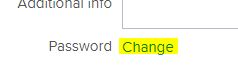
Highlighted word "Change"


Another password example

  1. Click the word "Change".
  2. Type a new password in the box that is displayed.
  3. Press the Enter key.
Voila! Your password should be changed. Be sure to remember your new password for the next time you log in to the website.

If you still have trouble getting your password changed, or if you have any other questions, contact tech@estesparknewcomers.org.

Upcoming Events

  • Easy Hike Trail to Emerald Lake
    Wed Jul 22 2026, 8:00am MDT
  • Moderate Hiking Group - Hike to The Loch
    Thu Jul 23 2026, 7:00am MDT
  • Fireside Chats
    Fri Jul 24 2026, 7:00pm CDT
  • Boardgame Night at The Legion
    Mon Jul 27 2026, 5:30pm MDT
  • Beach Blanket Bunco - July
    Tue Jul 28 2026, 5:45pm MDT
  • July Craft Club
    Wed Jul 29 2026, 6:30pm MDT

Featured Interest Group

DISCOVER THE INTEREST GROUPS

Recent News

Newcomers Notes Feb 2 2026

TECH TIP: Who’s the Primary Contact?

TECH TIP: Check Spam for Newcomers Email

Estes Park Newcomers Club
PO Box 2282
Estes Park, CO 80517

QUESTIONS? WHO TO CONTACT

© Copyright 2019, Estes Park Newcomers Club
Site Powered by engageRE | © 2026 real.leads, inc. | Select images used with permission - © Can Stock Photo | WordPress Access | Agent Portal